UPI verification
PayLink UPI payments go straight from the payer's bank to your UPI ID, so no bank tells PayLink they arrived. The payer enters the 12-digit UTR (and optionally a screenshot); you confirm it. Your webhook fires only after you decide.
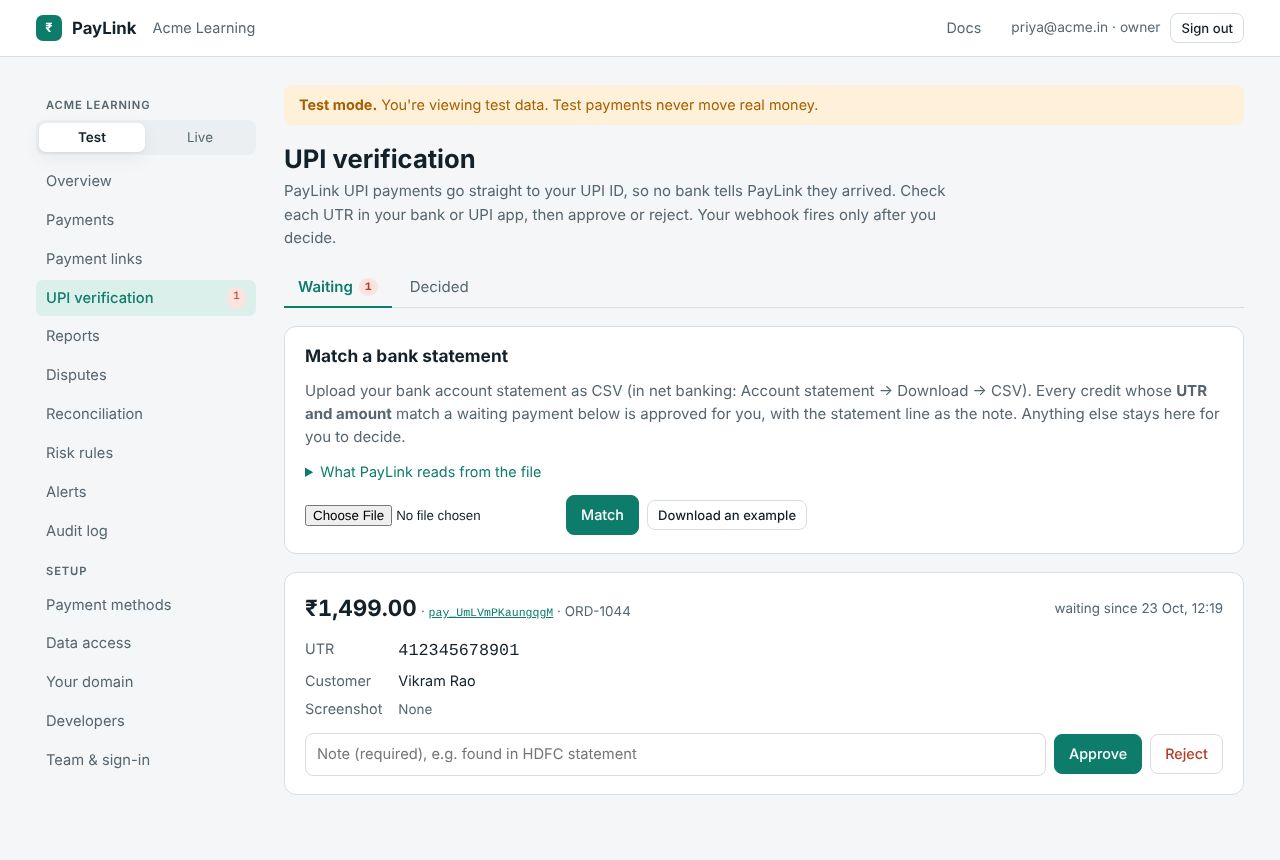
Waiting
Each waiting payment shows the amount, your reference, the UTR the payer typed, when, and the screenshot if any. Check your bank or UPI app for a credit with that UTR and amount, then Approve or Reject, with a note (required; it's kept on the payment's journey). A UTR already used on another payment is refused when the payer enters it, so one bank credit can never pay two payments.
Match a bank statement
Instead of checking one by one, upload your bank account statement as CSV (in net banking: Account statement → Download → CSV). Every credit whose UTR and amount match a waiting payment is approved for you, with the statement line as the note. Anything else stays for you to decide.
What PayLink reads from the file:
- The header row, found even below the bank's account details at the top. It needs a narration column (
Narration,Description,ParticularsorRemarks) and a money column (DepositorCredit, or oneAmountcolumn with aCr/Drcolumn). - Credits only. Withdrawals (debits) are skipped.
- The UTR: the 12-digit number in the reference column (
Ref No,UTR,Chq./Ref.No.) or inside the narration, e.g.UPI/412345678901/RAVI KUMAR/…. It's the same 12 digits your payer typed. A UPI ID such asravi@okhdfcbankis never taken for a UTR. - The amount must be exactly the payment's amount. A different amount is listed for you to check, never approved.
- A date column is shown with each line, if there is one.
Download an example gives a statement in the shape PayLink reads:
Date,Narration,Ref No,Withdrawal,Deposit,Balance
21/10/2026,UPI/412345678901/RAVI KUMAR/ravi@okhdfcbank/Fees,412345678901,,1499.00,25499.00
21/10/2026,UPI-ASHA-asha@ybl-423456789012-Fees,UPI-423456789012,,500.00,25999.00
22/10/2026,NEFT RENT OCTOBER,N123456,8000.00,,17999.00
Tested with HDFC- and ICICI-style exports. If your bank's file isn't read, compare it with the example and rename its columns.
After matching you see how many credits were read, how many payments were approved, how many need a look (a UTR matched but the amount differs, or the payment isn't waiting), how many weren't PayLink payments, and how many credits had no UTR. Lines that need a look stay listed under From statements: matched a UTR, but not approved until you decide the payment.
Decided
The Decided tab lists past approvals and rejections, newest first: payment, amount, decision, UTR, note, who decided (a person, a key, or "bank statement") and when. Filter by approved or rejected and by date range, search, 50 a page.
Scripting it
Everything here works with an automation key with upi.verify: GET /api/tenant/upi/pending, POST /api/tenant/upi/{attempt}/approve|reject, POST /api/tenant/upi/statements, GET /api/tenant/upi/decided. See UPI automation.