Platform admin guide
You run one PayLink installation for many businesses ("tenants"). This page is the map; each section links to the details.
Your first day
- Run PayLink with a mounted data folder.
- Complete first-run setup: platform database, LoginLink, and your own admin sign-in.
- Decide who may open
/admin. - Set the platform settings: public address, whether businesses may sign up themselves, which database options they get, email for alerts, limits.
- Review the connector catalog: which payment methods tenants may use, per mode.
- Optionally: database auto-provisioning, partner onboarding, location data, tenant subdomains and domains, FileLink.
The platform console (/admin)
| Page | What it's for |
|---|---|
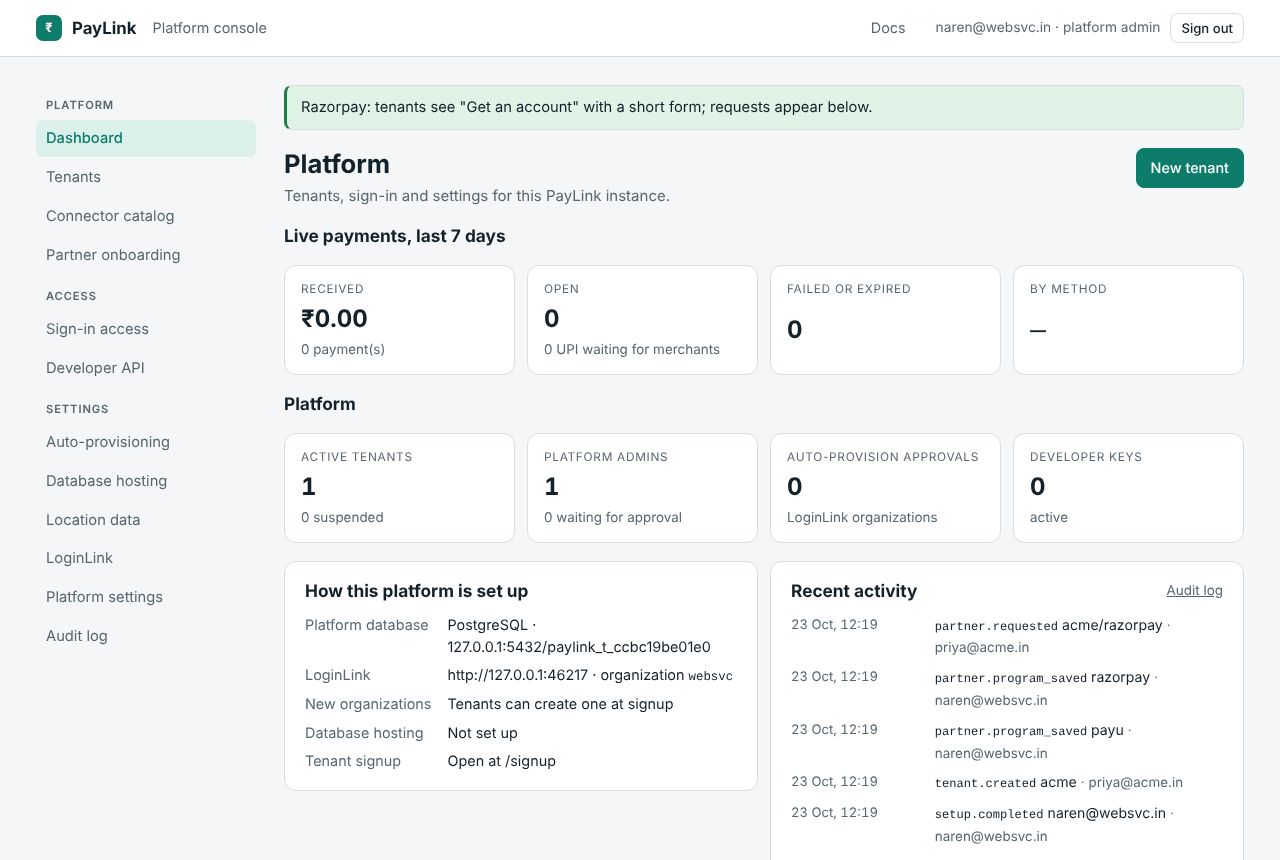
| Dashboard | Live payments in the last 7 days across tenants (received, open, UPI waiting for merchants, failed, by method, per tenant), platform counts, how the platform is set up, recent audit entries, tenants that failed to migrate at startup. |
| Tenants | Every tenant, search, create one, open one to suspend it, change its console address, move its data, or see its gateway account requests. |
| Connector catalog | Install, allow, limit, drain and uninstall payment connectors, and install connector packages from nuget.org without a restart. |
| Partner onboarding | Help tenants get gateway accounts and track their requests. |
| Sign-in access | Who may open /admin, and approve people waiting. |
| Developer API | Platform keys (pdk_) for scripts and products built on PayLink. |
| Auto-provisioning | Which LoginLink organizations may have a MySQL database created at signup. |
| Database hosting | Where PayLink creates databases: a MySQL server, Plesk or cPanel. |
| Location data | A country database and the Tor exit list for tenants' risk rules. |
| LoginLink | The LoginLink connection and the optional platform credential for creating organizations. |
| Platform settings | Everything else: signup, public address, tenant database options, SMTP, payer page badge, CrudApi address, file storage, subdomains, moving the platform database, limits, backups. |
| Audit log | Every platform action, hash-chained. |
Platform admins have admin access (everything) or support access (read-only /admin). Platform admins don't get into tenants' consoles: those belong to each tenant's own team.
Everyday tasks
- A business asks for an account: if signup is open they do it themselves at
/signup; otherwise create it in Tenants → New tenant or withPOST /api/admin/tenants. - A tenant is abusing the platform: open it in Tenants and Suspend. Its team can't sign in, its checkouts say it can't take payments right now, and its keys answer
403 tenant_suspended. Nothing is deleted; Reactivate undoes it. - A gateway is having an outage: in the Connector catalog, Drain it. Checkouts stop offering it; payments already in flight finish normally.
- A tenant outgrows SQLite: Tenants → tenant → Move this tenant's data to MySQL or PostgreSQL. PayLink copies and counts every row, then switches.
- Back up: keep a copy of the data folder, or download one from Platform settings → Backup. See backup and moving.