Connector catalog
Each payment method is a connector: its own NuGet package that depends only on WebSvc.PayLink.Abstractions, so updating one can't break another. Admin → Connector catalog is the first of three gates a method passes before a payer sees it (then the tenant turns it on, then the payment has to fit).
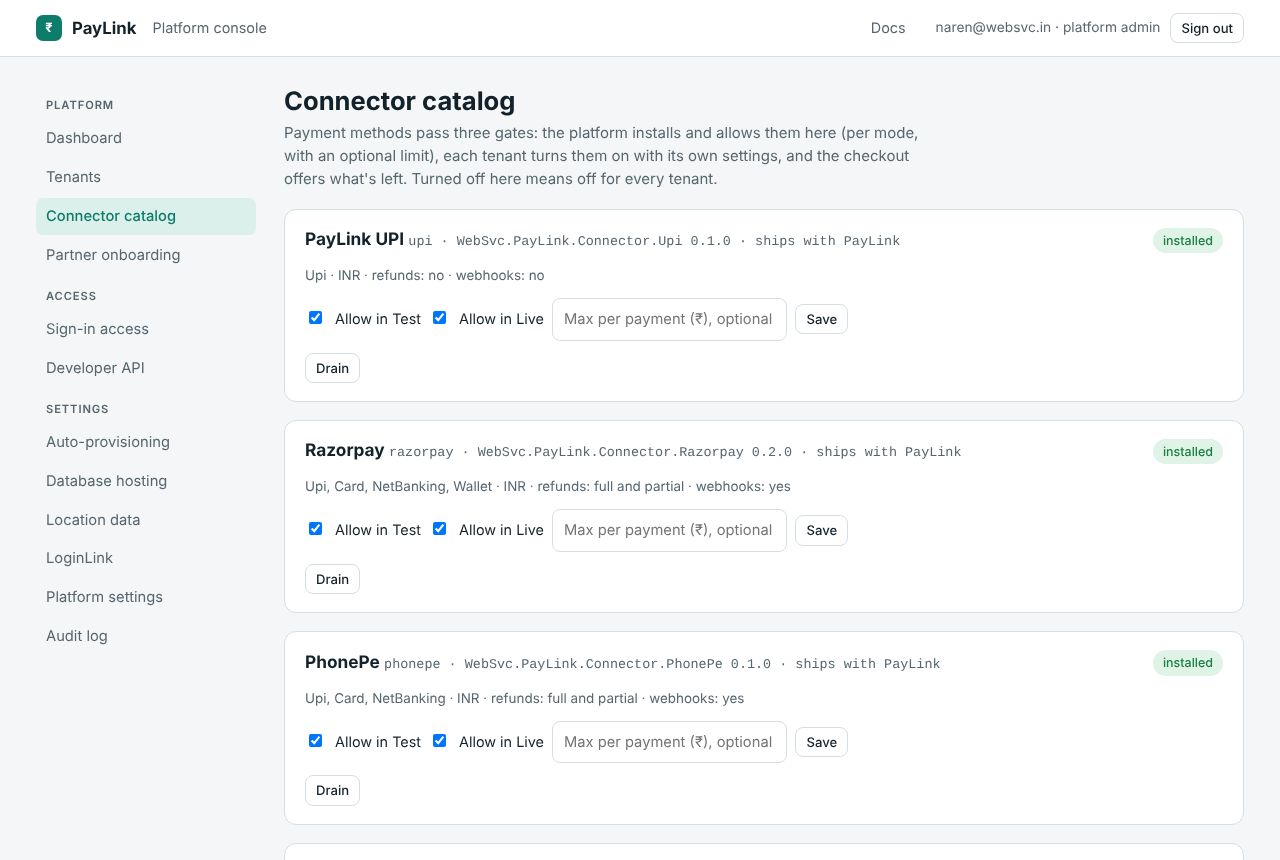
For each connector
The card shows its id, package and version, whether it ships with PayLink or was installed as a package, its methods (UPI, cards, net banking, wallets, EMI, pay later), currencies, refunds (full, partial or none), webhooks, and whether it's test-only.
| Action | Effect |
|---|---|
| Allow in Test / Allow in Live | Off means no tenant can use it in that mode. The Simulator is test-only. |
| Max per payment (₹) | Payments above it aren't offered this connector, for every tenant. |
| Drain | Checkouts stop offering it; payments already started with it finish normally. Use it during a gateway outage or before removing it. |
| Install again | Back to normal from draining or uninstalled. |
| Uninstall | From draining only. It disappears from tenants' consoles; their saved settings are kept in case you install it again. |
| Roll back to {version} | For an installed package: back to the version before the last update. |
| Use the built-in version | For a package that replaced a built-in connector. |
Installing or updating a package
Install or update a connector package: a package id and version from nuget.org (latest if empty), or an uploaded .nupkg. PayLink downloads it, loads it in its own load context (so its libraries can't clash with another connector's) and starts using it without a restart. A failed install leaves the current version running. A package with the id of a built-in connector replaces it.
Only package ids starting with an allowed prefix can be installed, because a package is code that runs inside PayLink. The default is WebSvc.PayLink.Connector.; change it with PayLink__Connectors__AllowedPackagePrefixes (comma-separated).
Installed packages live in the data folder (connectors/) and are loaded again at startup.
Connectors in this release
| Connector | Package | Methods |
|---|---|---|
| PayLink UPI | WebSvc.PayLink.Connector.Upi | UPI |
| Razorpay | WebSvc.PayLink.Connector.Razorpay | UPI, cards, net banking, wallets |
| PhonePe | WebSvc.PayLink.Connector.PhonePe | UPI, cards, net banking |
| PayU | WebSvc.PayLink.Connector.PayU | UPI, cards, net banking, wallets, EMI |
| CCAvenue | WebSvc.PayLink.Connector.CCAvenue | UPI, cards, net banking, wallets, EMI |
| Stripe | WebSvc.PayLink.Connector.Stripe | Cards, wallets |
| PayPal | WebSvc.PayLink.Connector.PayPal | PayPal, cards, pay later |
| Simulator | WebSvc.PayLink.Connector.Simulator | Test only |