SCIM Provisioning
SCIM (System for Cross-domain Identity Management) lets your own identity provider — Okta, Azure AD/Entra, or any SCIM 2.0-compliant IdP — create, update, and deactivate users in your LoginLink tenant automatically. This is pure server-to-server automation: your end users never see or interact with SCIM directly.
Enabling SCIM
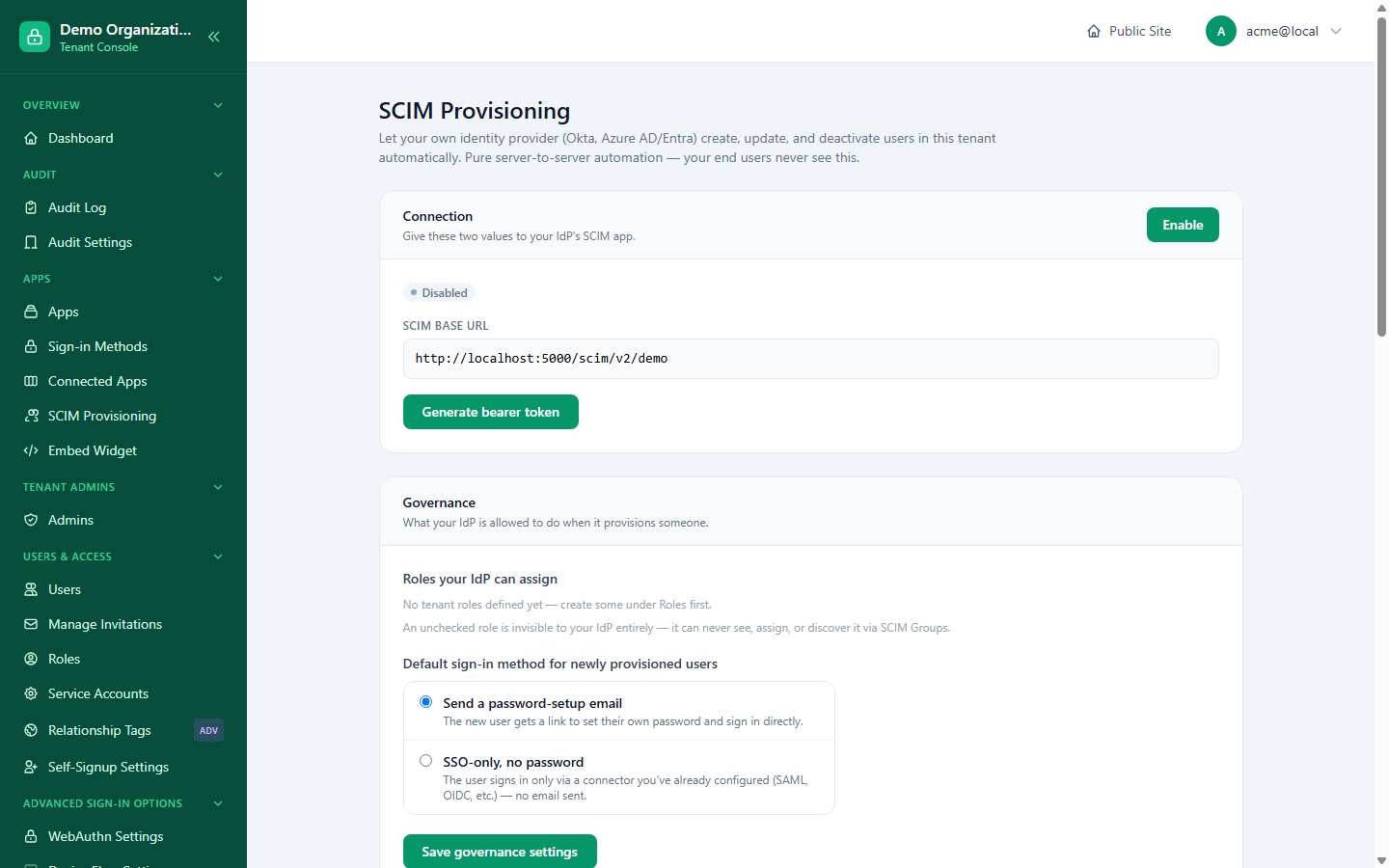
Console → SCIM Provisioning gives you:
- An enable/disable toggle for the whole feature.
- A base URL:
https://auth.yourtenant.com/scim/v2/{tenantSlug} - A bearer token, generated on demand and shown exactly once — paste it into your IdP's SCIM app configuration immediately, since it can't be revealed again (rotate or revoke and generate a new one if it's lost).
- Governance: which of your tenant's roles the IdP is allowed to see and assign. A role you don't check here is invisible to the IdP entirely — it can never discover, assign, or touch it via SCIM.
- Default sign-in method for newly provisioned users: either a password-setup email, or SSO-only (no password at all — the user signs in only through a connector you've already configured, such as SAML or OIDC).
Configuring your IdP
Point your IdP's SCIM app at the base URL above, using OAuth Bearer Token as the authentication method with the token from Console. Most IdPs (Okta, Azure AD) will immediately probe the discovery endpoints (ServiceProviderConfig, ResourceTypes, Schemas) to confirm the connection before you assign anyone.
What gets synced
Users
| SCIM field | Maps to |
|---|---|
userName | Your primary email identifier |
name / displayName | Account display name |
active | Account status (active / suspended) |
externalId | Your IdP's own opaque user ID, stored for later lookups |
Deprovisioning a user in your IdP (setting them inactive, or unassigning the app) sends active: false — LoginLink suspends the account rather than deleting it, so historical data and audit trail are preserved.
Groups → Roles
SCIM Groups map onto your tenant's existing roles, restricted to whatever you've allowed in the governance section above. Pushing group membership changes from your IdP (Okta and Azure AD both call this "group push") grants or revokes the corresponding role — the same role assignment Console itself uses, so a role granted via SCIM behaves identically to one granted by hand.
Recent activity
Console shows a live feed of the most recent SCIM-driven changes — user created, user deactivated, role granted/revoked — so you can confirm your IdP's provisioning is actually reaching LoginLink without digging through raw audit logs.
Relationship to the Management API
SCIM and the Management API solve different problems. SCIM is a fixed, industry-standard protocol whose only caller is your IdP, syncing users into a tenant that already exists. The Management API is a broader, LoginLink-specific REST surface for scripting anything else — bulk operations, internal tooling, test automation — authenticated with the same OAuth client_credentials grant your other apps already use.